Abre mil páginas como una.
PageHawk es un estudio de documentos: toda tu biblioteca en una ventana, y control total de cada página que hay en ella. Léela, búscala entera de una vez, anótala, reescríbela y devuélvela a su sitio. La unidad de trabajo es la biblioteca, no el archivo. En tu Mac. Sin subidas automáticas.
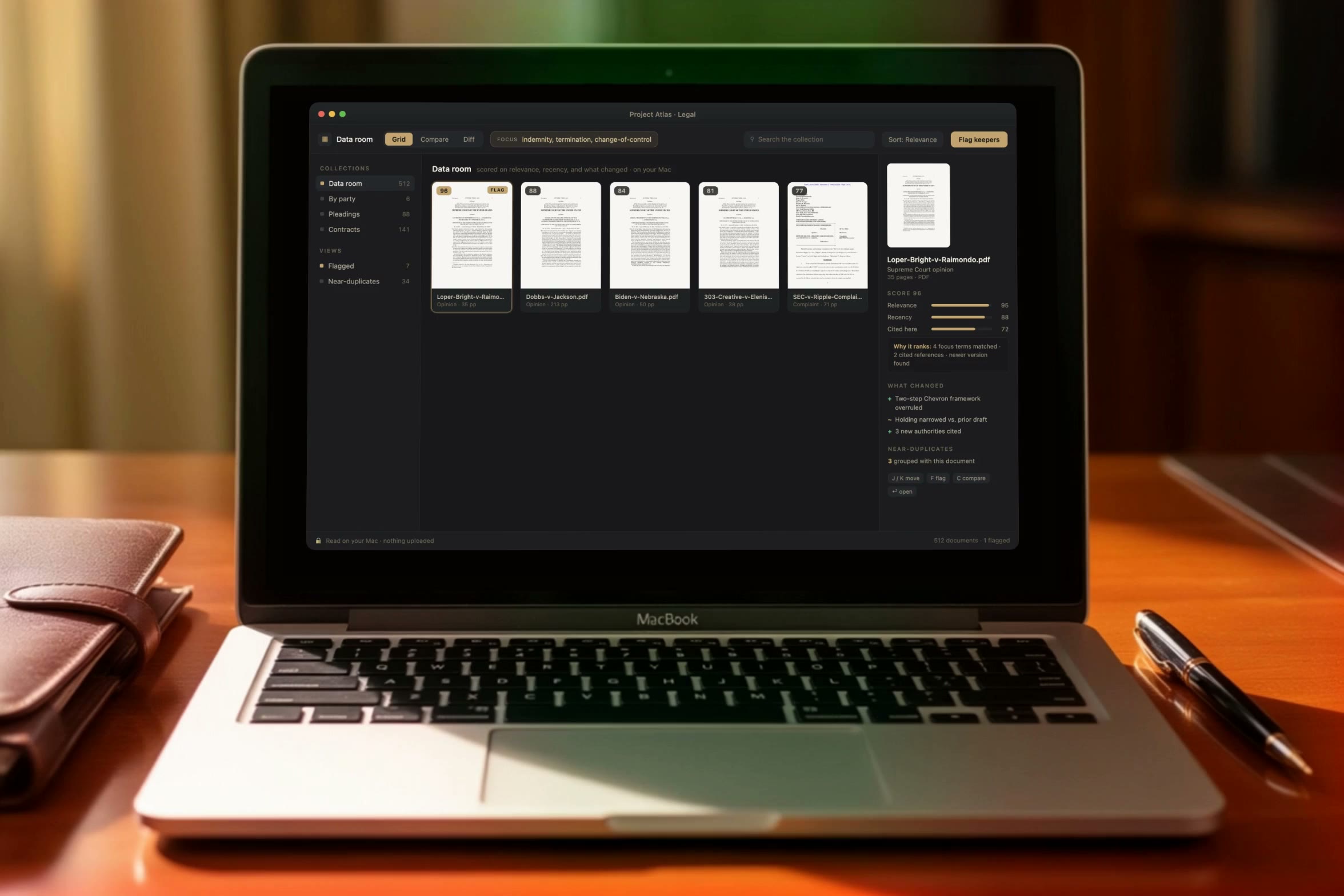
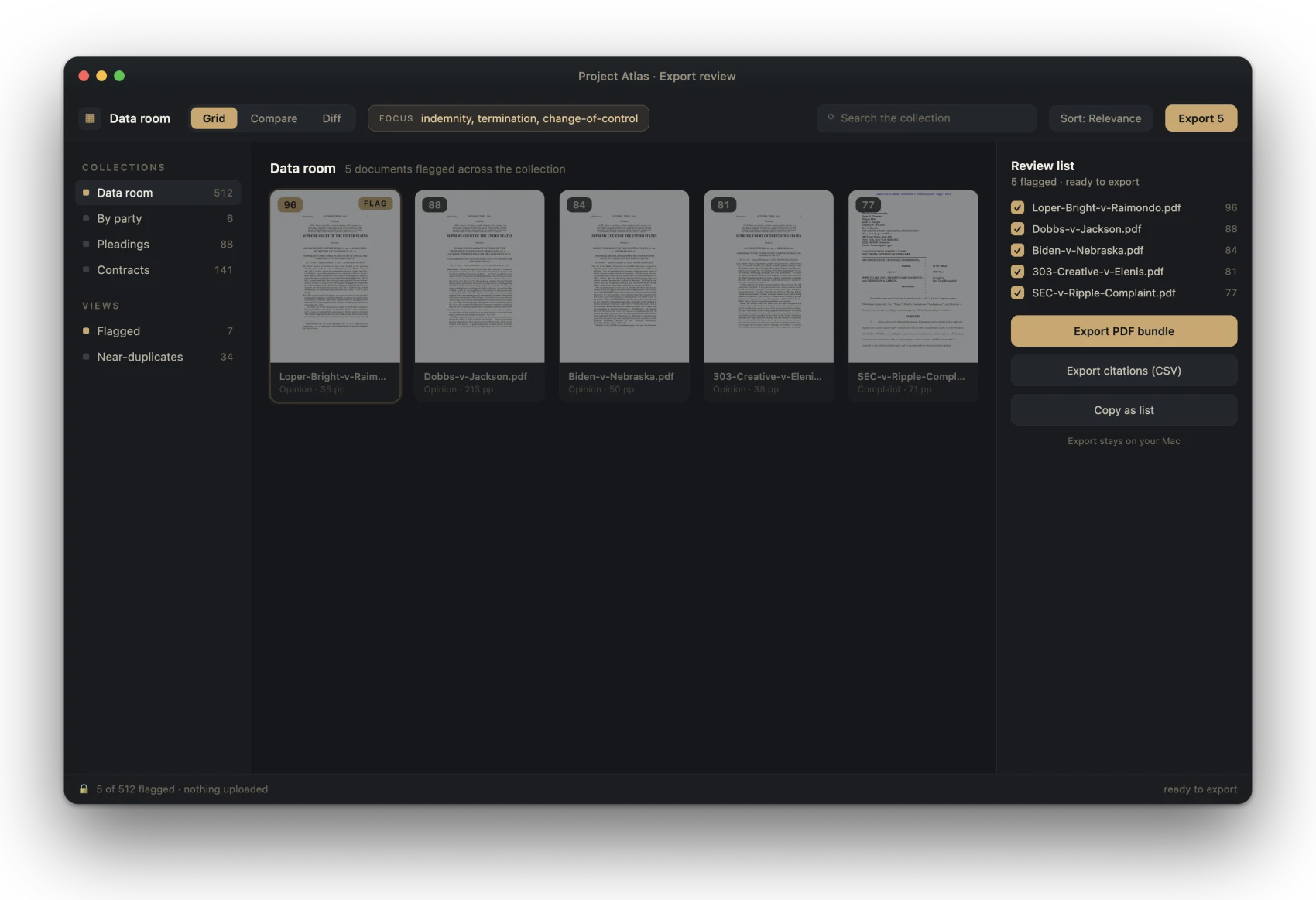
PageHawk on a 512-document legal data room: every file scored, the keeper flagged, the diff in the panel, the whole collection on your Mac. Shown with real public court records as sample data.
Large documents take hours. PageHawk gives most of them back.
Researchers, analysts, students, lawyers and writers all know the same day: a reading list that takes an afternoon to open, the one version that matters buried in a folder of forty, and the answer three hundred pages in. PageHawk was built for exactly that day.
“If I have documents that use a lot of data, Adobe Acrobat Reader is one of the slowest tools on the market.”
Capterra review of Adobe Acrobat Reader, on the reader most Macs already have (not a PageHawk customer)We measured that reader ourselves on a Mac, then built PageHawk around what we found. 30 preference panes behind seven tools became one pane. A Compare tool capped at exactly two files became one that takes a whole folder. A 1.68 GB update downloaded without asking became one that always asks first.
Every profession that reads for a living spends time the same way: a literature review screens hundreds of papers to keep dozens; a semester of readings runs to thousands of pages; a deal requires reading every draft of every document. Legal work is simply where that spend has been measured and published, so these four numbers come from there. Two carry a published source; the other two are an industry estimate and a planning assumption, each labeled as what it is:
Keeping the work on the device pays a second dividend, and it is the one most people underrate. Unpublished research, a manuscript, an unsigned agreement, a client file: pasting any of them into a consumer artificial-intelligence ("AI") chat tool hands a copy to somebody else's server. Where that has been tested in court the answer was unforgiving: a February 2026 ruling (United States v. Heppner, Southern District of New York, Judge Rakoff) held that a defendant's own exchanges with a public AI tool were not covered by attorney-client privilege, because the tool is not an attorney and no lawyer was party to them. PageHawk answers on your Mac, so whatever you are reading stays yours. And whether the hour is billed, grant-funded or simply your own, every quarter-hour the reader gives back goes to the work itself.
Click a defined term. Land on its source. Jump back.
One request keeps coming up in professional document work: stop scrolling to find where a term was defined. Try the loop below, then imagine it across a 400-page agreement.
11.2 Effect of Termination.
Upon any termination under Section 11.1, Client shall pay the Termination Fee within thirty (30) days, except where such termination follows a Change of Control of Provider, in which case the schedule set out in Exhibit C governs.
Click any underlined term above to jump to where it is defined.
This is an interactive simulation of the reference-jump loop, shown here so you can feel it. Three independent tools (CoParse, Macro, Sioyek) each built an entire product around this one loop; PageHawk is building it into the reader itself, rather than into one more tool to switch to. The same loop reads a paper: citation to reference and back.
Ve el conjunto entero, no un archivo a la vez.
Leer una pila grande de documentos es lento porque solo puedes abrir uno a la vez. PageHawk despliega el conjunto completo de una vez, lo compara y lo puntúa, y te lleva directo a lo que importa.
- 1ReúneArrastra una carpeta, una sala de datos, un expediente o una pila de versiones en PDF. PageHawk los lee todos y los despliega juntos.
- 2ComparaCada documento, lado a lado, puntuado según tu consulta principal, la fecha y lo que cambió entre versiones. Los casi duplicados se agrupan.
- 3ConservaRevisión con el teclado por delante, tan rápida que nunca alcanzas el ratón. Marca los que conservas y expórtalos adonde haga falta.
A few moves over your whole document library.
It does the slow parts and leaves the judgment to you.
Rank what matters.
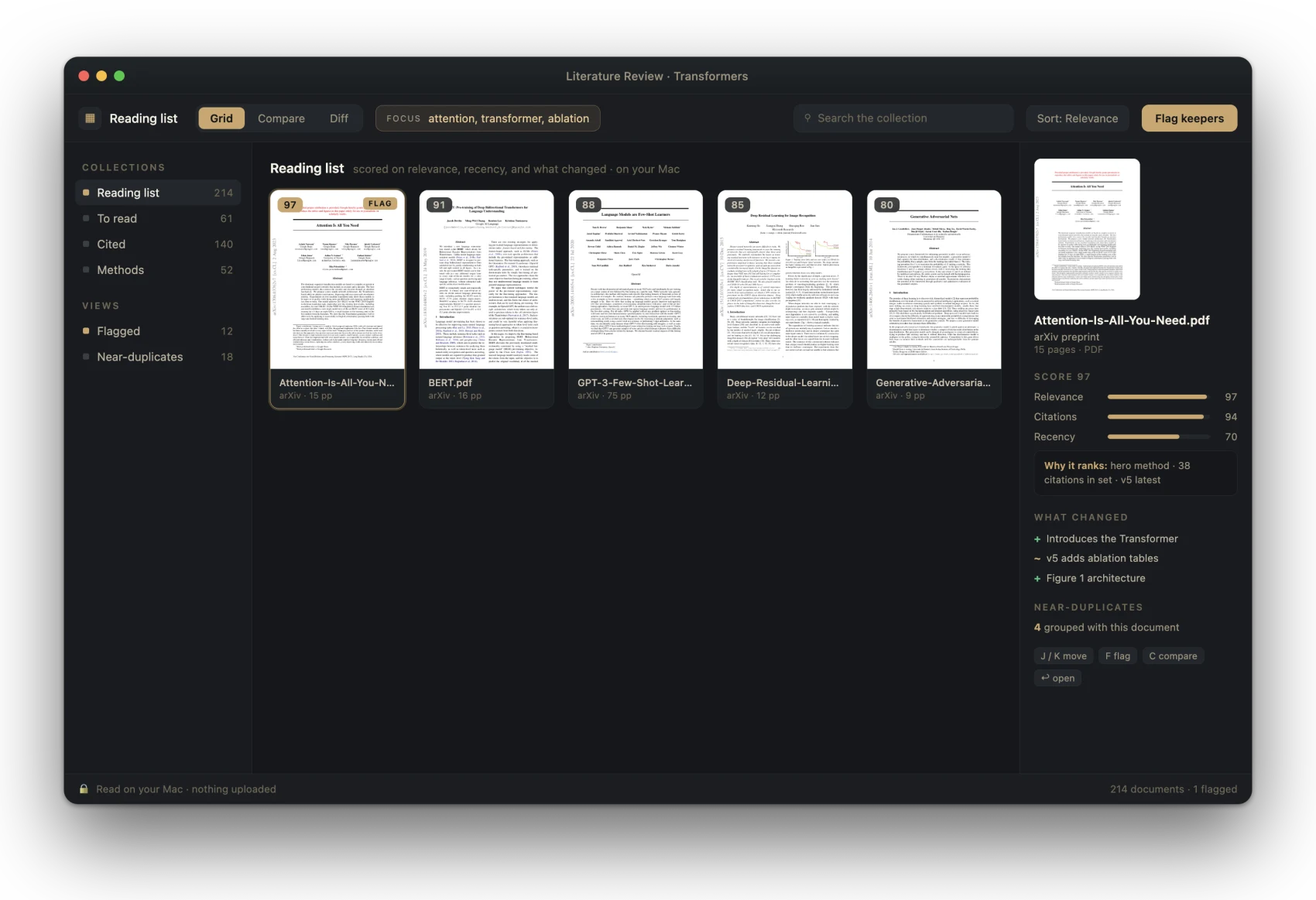
Point PageHawk at what you care about: a clause, a metric, a method. It scores every document on that focus, plus recency and what changed, so the page you need rises to the top.
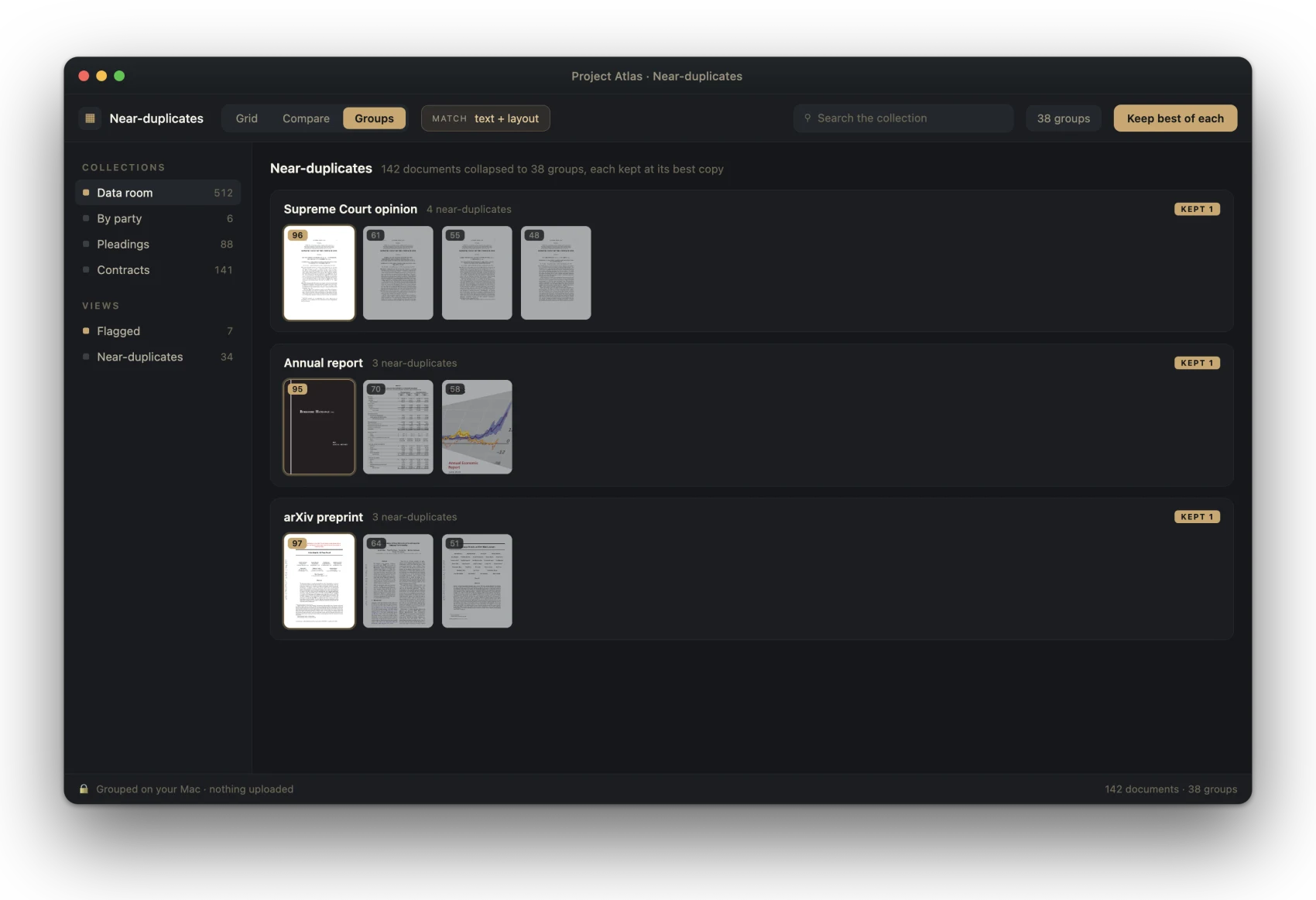
Group the near-duplicates.
A folder of 142 files becomes 38 groups, each with its best copy. You review 38 groups and read the memo once.
Export a review list.
Flag the keepers and send them on: a PDF bundle, a citation list, or a copy-paste set. The export stays on your Mac.
Ask your documents. Privately.
Ask a question of one document or a whole folder and get an answer with page citations, generated on your Mac. Summaries, key terms, and an AI-built table of contents for the PDFs that ship without one. Nothing goes to a server, so answering a question about a privileged document does not disclose it to an AI provider.
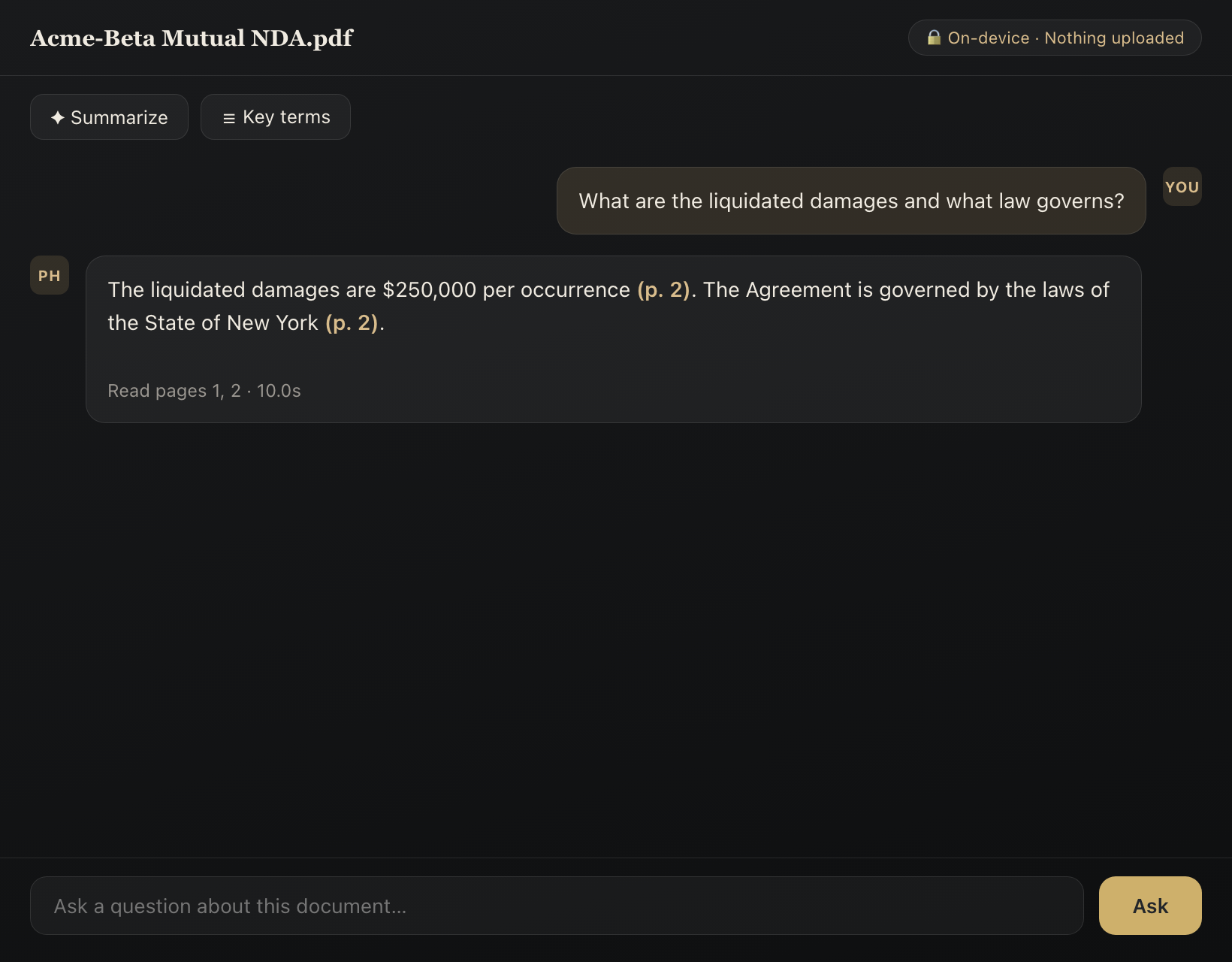
The real Ask panel, answered on device.
Redline, redact, and stamp.
Word-level compare with tracked-changes and PDF redline exports, built and in the app today. True burn-in redaction, shipped today: the text is removed from the file, along with its metadata. What is gone stays gone. Batch Bates numbering, shipped today, with stamps burned into the page as real content. The discovery-production detail, including the audit manifest and the load file, lives on the page for legal teams.
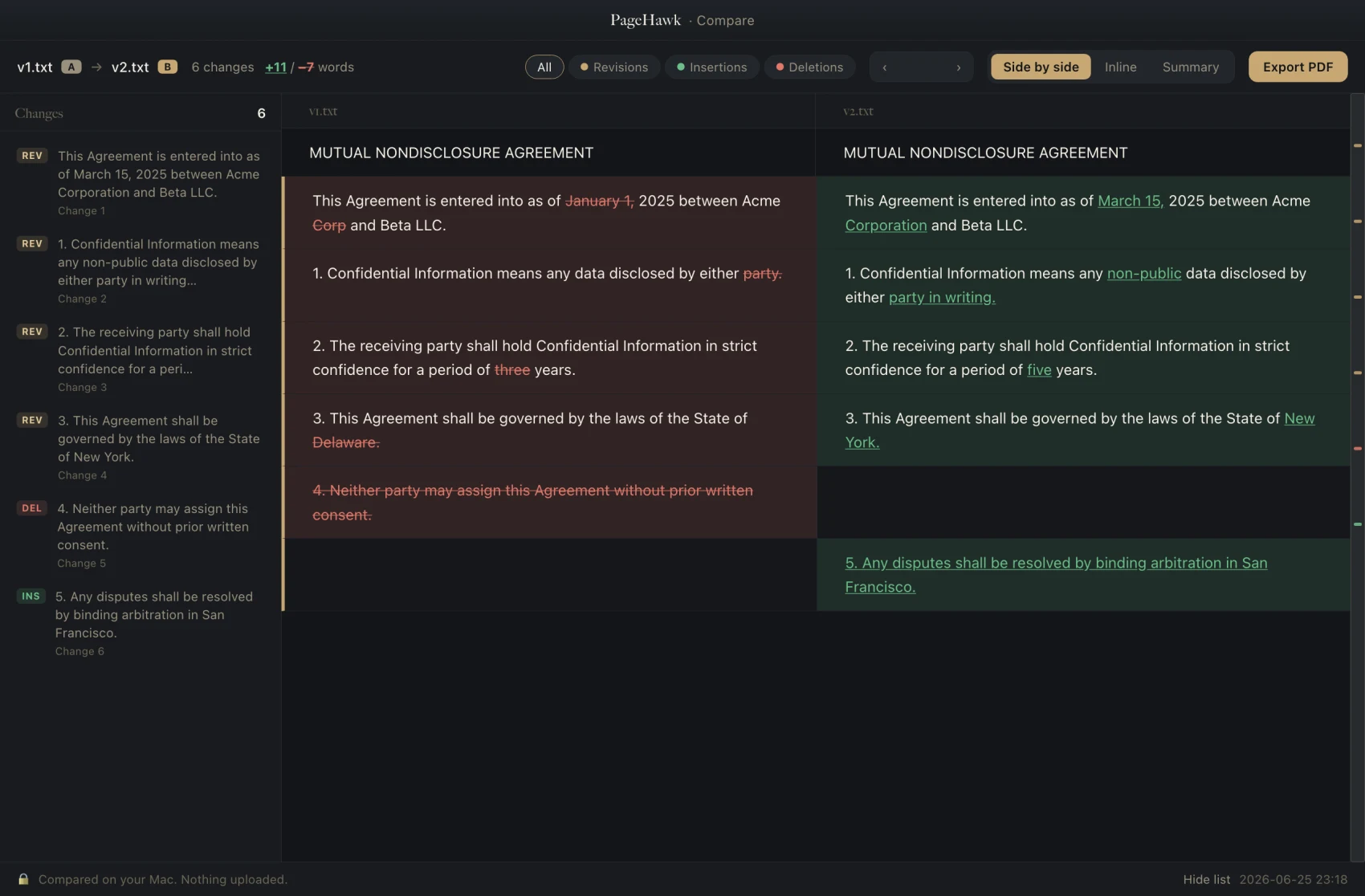
A real PageHawk redline, rendered on device.
Make it your default. It earns the double-click.
The everyday jobs most people open Adobe for: signing, shrinking, covering up, filling, reading. Fast, on your Mac, with nothing uploading on its own. And the whole-folder work above comes with it.
Sign, and the signature is part of the page.
Draw, type, or import your signature, drop it on the line, and PageHawk burns it into the page, so it stays with the document wherever it goes. The document's text stays selectable.
Shrink big PDFs.
A five MB scan-heavy file becomes a fraction of itself: images are recompressed for screen while the text stays vector and is never recompressed. It shows you the before and after sizes, and skips the file when there is nothing to save.
Whiteout, fill, and stamp.
Cover anything with a burned-in white block, fill forms in place, and add notes and highlights. For true removal, use Redact: whiteout covers the text, redact destroys it underneath.
Clean metadata, in one tap.
Its own action, separate from redaction: strips the hidden author, software, and date fields and the embedded Extensible Metadata Platform ("XMP") packet before you share. It shows you what it found first, and it never redacts or alters a page, so the text stays selectable. This one is part of Pro, alongside burn-in redaction and Bates numbering; everything else in this section is in the free reader.
Reads like a native Mac app should.
Page thumbnails, continuous scroll, find, dark reading themes, read-aloud. And every document reopens exactly where you left off.
Opens more than PDFs.
Word, PowerPoint, Excel, and iWork files open straight in the same fast reader, converted on your Mac and cached.
One click to make it yours.
PageHawk asks once to become your default PDF app, then leaves it alone. One click, reversible anytime in Finder's Get Info.
Tus acuerdos, donde trabajas.
PageHawk es totalmente independiente. Todas sus funciones operan sin necesidad de una cuenta de SealHawk, y conectar una no limita nada. Si usas SealHawk, conéctalo para consultar los acuerdos firmados, sus plazos de renovación y aviso, y archivar documentos directamente desde el lector. Sin nada conectado, PageHawk jamás contacta a SealHawk.
Consulta los plazos junto a tus documentos.
PageHawk muestra los plazos de renovación y aviso calculados a partir de los términos de tus acuerdos. Revisa las fechas importantes junto al texto del documento y abre el acuerdo firmado con un solo clic. Da seguimiento a tus compromisos contractuales sin salir de tu biblioteca local de archivos PDF.
Archiva documentos en SealHawk.
Envía documentos desde PageHawk a tu biblioteca de acuerdos de SealHawk. Si la conexión solo permite acceso de lectura, PageHawk te solicita volver a conectarte con permiso de archivo. Recibes un paso a seguir claro en lugar de un intento fallido de archivo sin explicación.
El acceso permanece limitado.
La conexión puede leer tu biblioteca de acuerdos y, con tu permiso, archivar documentos en ella. SealHawk aplica ese límite en el servidor, respaldado por su propia suite de pruebas. PageHawk no puede redactar sobres, enviar solicitudes de firma, acceder a plantillas ni a enlaces de firma.
Las credenciales permanecen en tu Mac.
PageHawk conserva el token en el Llavero de tu Mac, con la sincronización de iCloud desactivada, por lo que nunca sale del equipo. Al desconectarte, se elimina junto con cada PDF de acuerdo guardado en caché por la conexión. Si revocas un dispositivo en SealHawk, la siguiente solicitud descarta el token, sin reintentos.
Vincúlate con un código de ocho caracteres.
Genera un código de un solo uso en SealHawk, válido durante 10 minutos. PageHawk lo envía a un endpoint público sin un encabezado de autorización. El código devuelve un token delimitado con acceso de lectura a tu biblioteca de acuerdos y, si lo autorizaste, permiso para archivar en ella.
Todos los códigos fallidos lucen iguales.
Los códigos no válidos, vencidos o reutilizados devuelven el mismo error, por lo que nadie que intente adivinar podrá saber por qué falló un código. Nuestra suite de pruebas confirma que coinciden, mientras que los fallos internos del servidor devuelven un mensaje distinto, lo que demuestra que la respuesta compartida es deliberada.
PageHawk es un estudio de documentos completo por sí solo. Conectar SealHawk añade tus acuerdos, sin convertir jamás a ninguno de los dos productos en un requisito para el otro.
See it for your work.
The same app, met at six different desks. Open the one that looks like yours.
Triage 200 papers for a literature review, compare revisions, and surface the ones that actually matter.
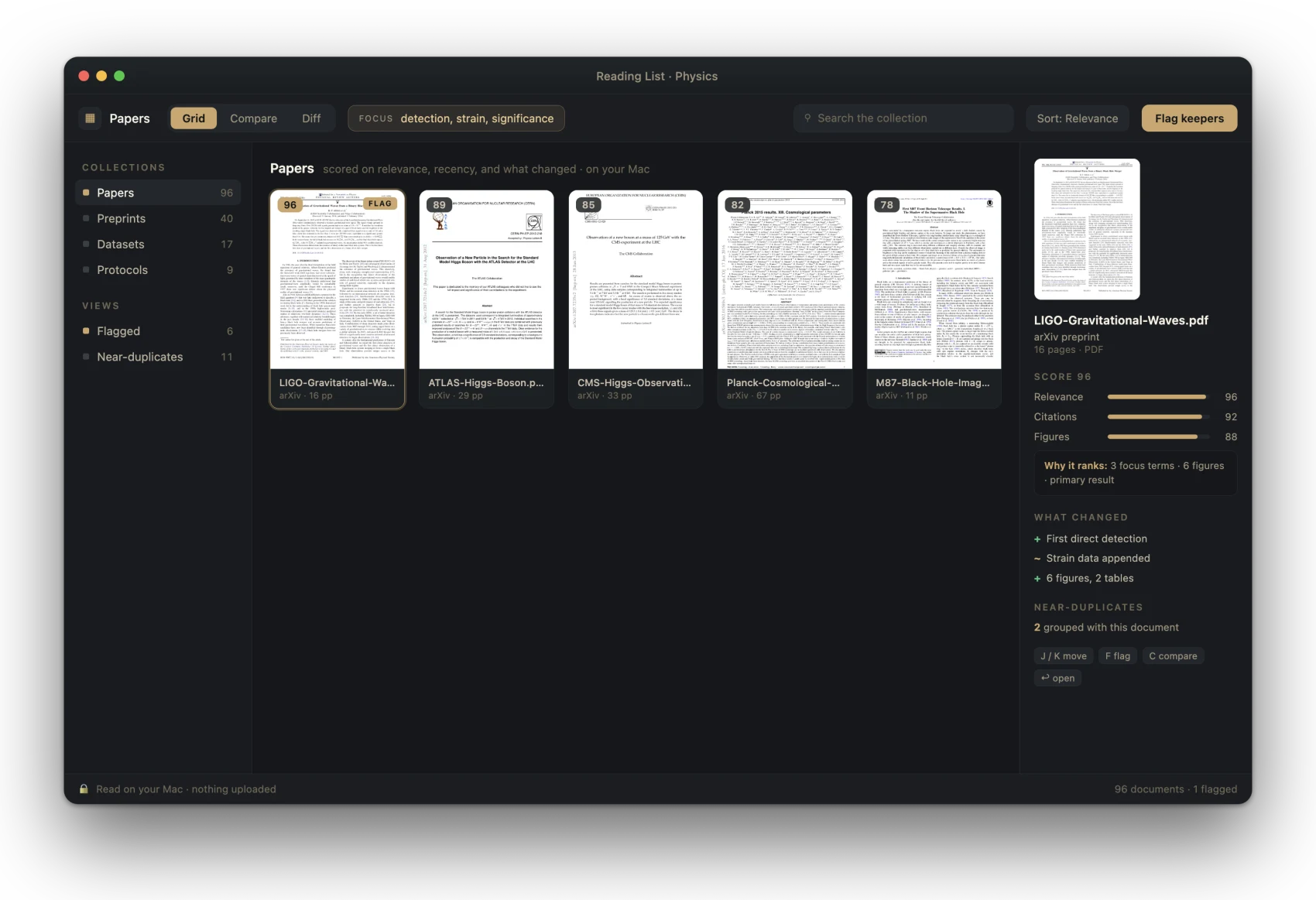
Group related papers and methods, read figure-heavy preprints side by side, with nothing sent to a server.
A semester of readings and sources in one place: find the passage you half-remember, keep the sources that earn their citation, and export the list.
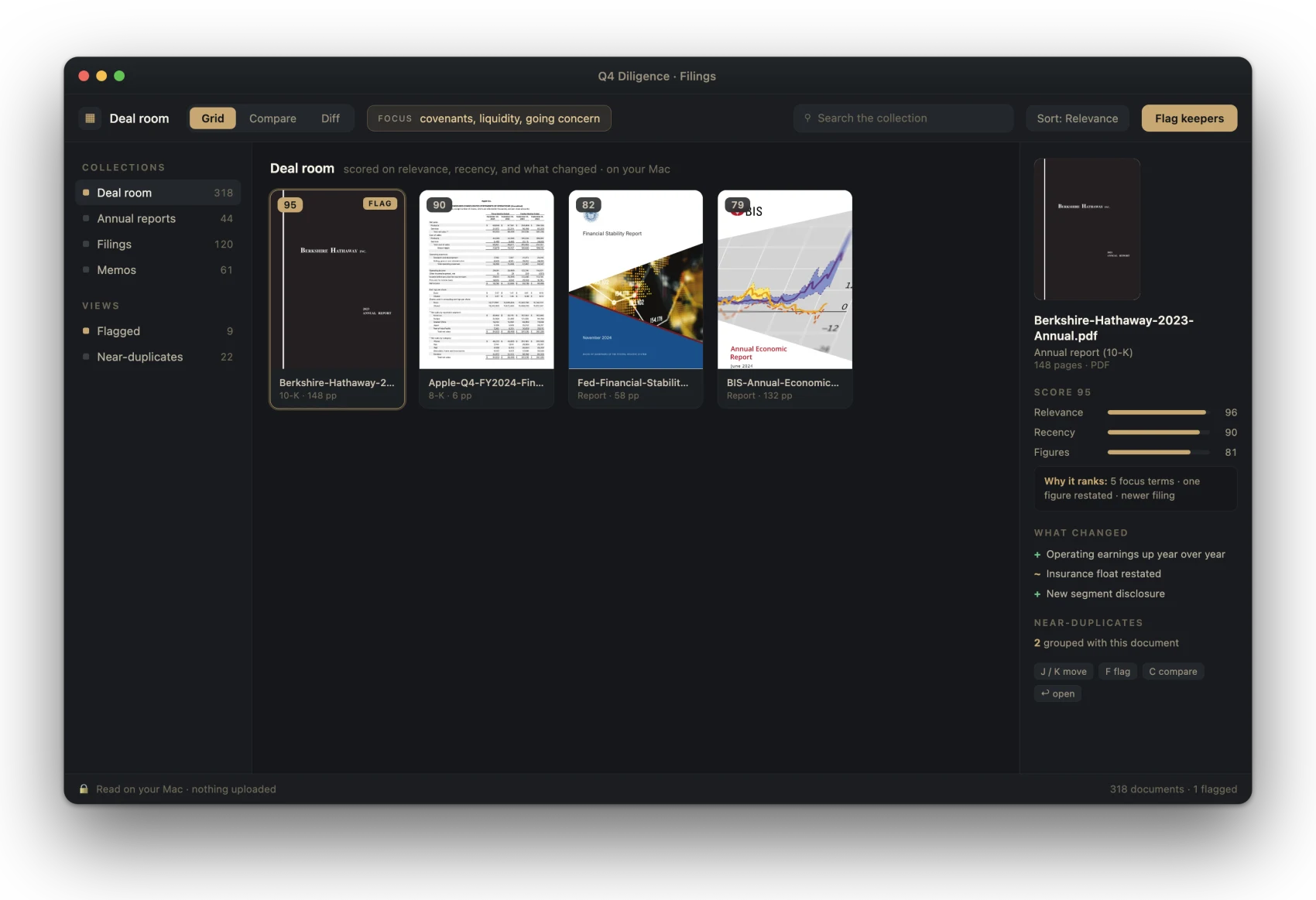
Compare filings, proposals, and deal drafts at the pace of the deal: quarter over quarter, version over version, in one pass.
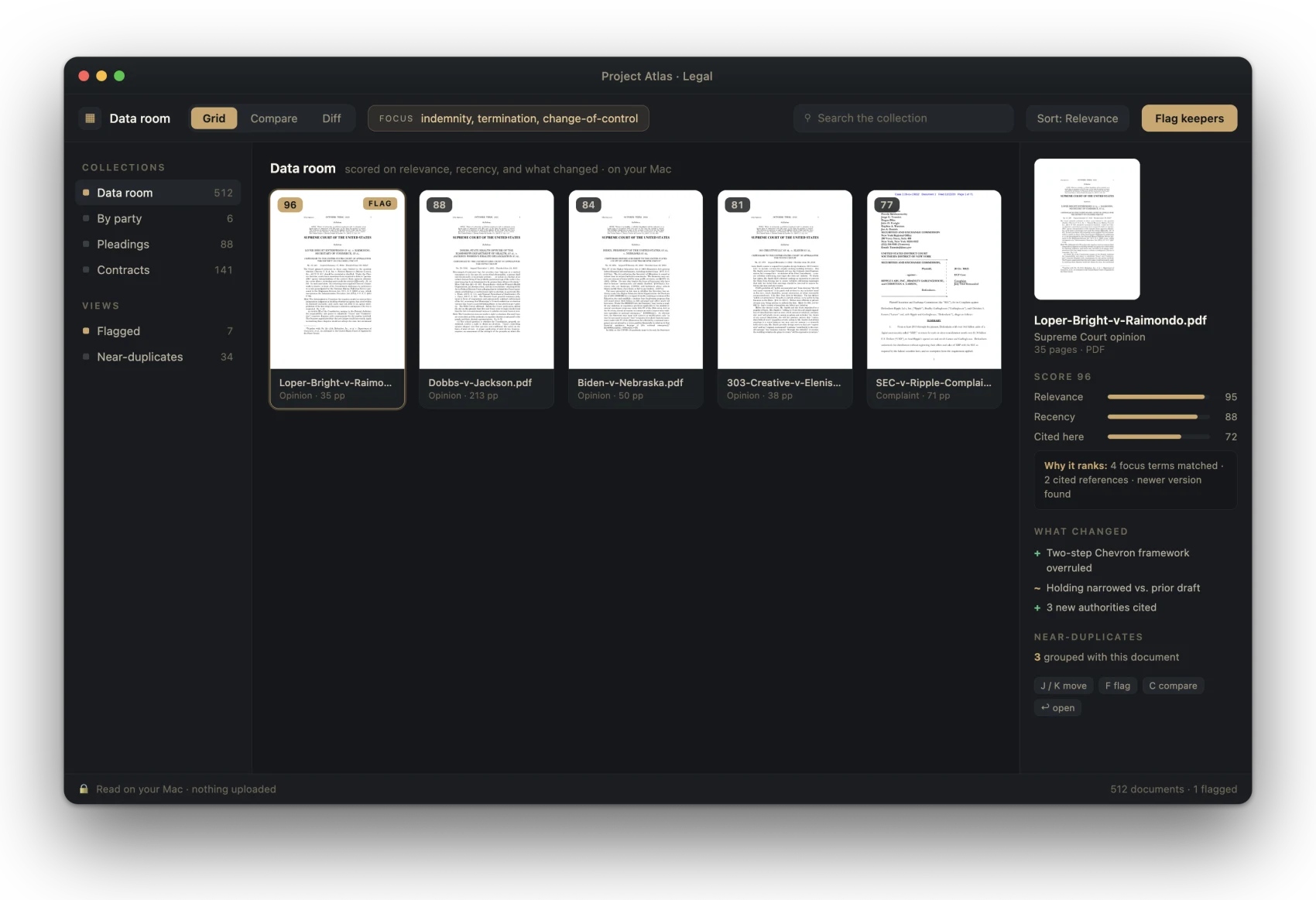
Find the changed clause across a 500-document data room, and the near-duplicate pleadings buried in a discovery production.
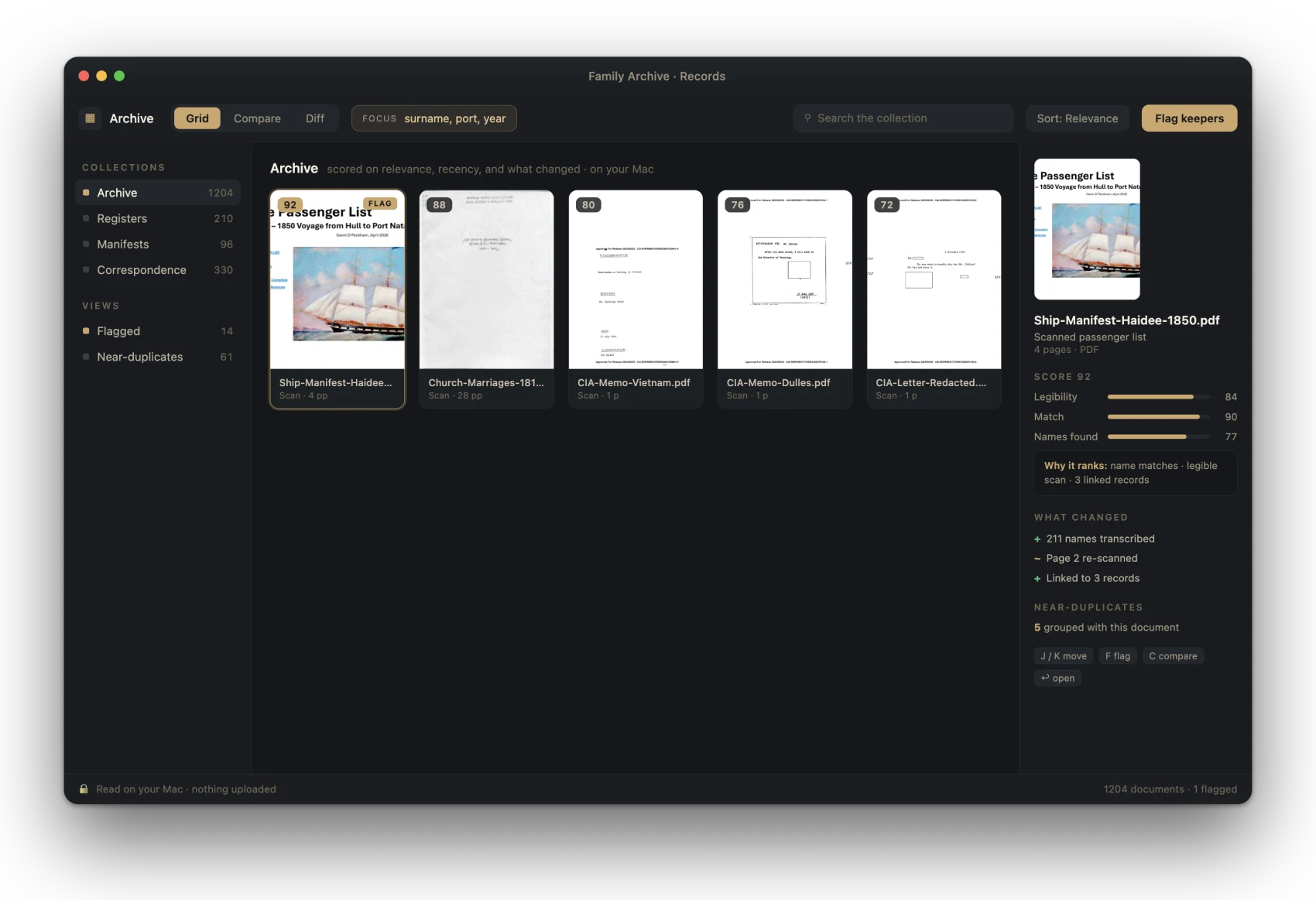
Review scanned archives that need Optical Character Recognition ("OCR"): registers, manifests, and declassified files, read and matched on your Mac.
Every screenshot is the real interface, populated with genuine public records: court opinions, Securities and Exchange Commission ("SEC") and central-bank reports, arXiv papers, national-archive scans. In PageHawk they would be your own files, read and scored on your Mac.
See exactly what changed.
Line up two versions of a contract, a manuscript, a filing, or a draft, or the whole chain of them. PageHawk marks every change, by page and by clause, so you keep the right one with proof instead of memory.
- Word-level redline, insertions and deletions color-coded
- Three views: Side by side, Redline (insertions underlined right on the page, deletions marked in the margin), and Summary, with a change rail running between the two documents
- Export a Word tracked-changes file or a PDF redline
- Batch compare: drop in two folders of versions, PageHawk auto-pairs them by filename and redlines every pair in one pass, all on-device, with a results table you open any pair from
- Draft Timeline, for when a negotiation is not two documents but a chain of them: drop in three or more drafts and PageHawk lays them out as a row of cards with the redline between each adjacent pair down the page. Drag a card, or press the left and right arrows, and every adjacent redline recomputes along the new order; only the genuinely new adjacencies are recalculated. Order by date sequences them from each file's own date. Adobe's Compare cannot hold a third file: its shipped module declares two named slots, old and new. In the app since version 0.57.
- Compare inside Microsoft Word: launch a comparison from a task pane and get native Word tracked changes back, on Word for Mac, Windows, and the web, without the documents ever leaving the device
- Word-level compare in Chinese, Japanese, Korean, and Thai, alongside every language written with spaces
Built to be shared: finish a comparison in the browser and one click turns it into a private link you can send to anyone. They see the redline, never a downloadable copy of your original files, and can run their own comparison free. Draftable, whose free online tool is named on our own comparison page, uploads your documents to its servers to diff them and sells its offline desktop app as the paid alternative. PageHawk compares on your device; sharing is a choice you make, never a default.
La vista de comparación de PageHawk, ilustrada: dos versiones lado a lado, los cambios señalados por color y el carril de cambios en el centro.
Tus archivos nunca salen de tu disco.
Ningún documento se sube. Ningún procesamiento en la nube. Ninguna cuenta necesaria para abrir tus archivos. PageHawk lee, puntúa y compara todo en tu Mac, y el índice que construye se queda en tu disco.
El trabajo entre el que eliges suele ser el que más necesitas mantener en privado: archivos de clientes, contratos sin firmar, investigación sin publicar, borradores que nadie más debería ver. Se quedan donde están.
- Every document feature runs before you make any account. The optional SealHawk panel is the one part that needs one, and you turn it on yourself.
- Every ask carries “Don't ask again” the first time we ask.
- Update checks stay out of your way: never modal, always declinable.
- No background downloads without asking first. Ever.
We wrote these after auditing, tool by tool, what the incumbents do to their users. The difference is the product.
Do what the cloud tools do, without the cloud.
Compare, ask, summarize, and redline alongside the tools built for each of those jobs, and keep the whole job on your Mac. Of the five rivals in the table below, only Preview is fully on device, and Preview cannot rank a folder, ask a question, or compare at all. Where a rival has a feature but uploads your file to get it, you'll see it marked.
| Feature | PageHawk | Preview (built into macOS) | Adobe Acrobat Pro | Foxit Editor+ | PDF Expert | LiquidText |
|---|---|---|---|---|---|---|
| Opens 200+ page, 30MB+ files without paging them in | ✓reading-first engine | ✓one file at a time | users report freezes | lags on complex files | ✓ | reported |
| Whole-folder triage: rank, group, score every document at once | ✓ | ✗ | ✗ | ✗ | ✗ | ✗ |
| Distraction-free by default (no popups, no forced panels) | ✓ | ✓ | ✗users report forced panels | partial | ✓ | ✓ |
| Ask your documents (AI Q&A, page-cited) | ✓on device | ✗ | ✓cloud | ✓cloud | ✓cloud | ✗ |
| Ask across a whole folder | ✓on device | ✗ | ✓cloud | partialcloud | ✗ | ✗ |
| Compare PDF, Word & text + redline exports (Word tracked-changes, PDF) | ✓ | ✗ | PDF-centric | ✓ | ✗ | ✗ |
| True redaction (text removed, metadata stripped) | ✓ | no metadata strip | ✓ | ✓ | ✗ | ✗ |
| Bates numbering for discovery | ✓burned in + load file | ✗ | ✓ | ✓ | ✗ | ✗ |
| OCR scanned / image-only documents | ✓ | basic text capture | ✓ | ✓ | paywalled add-on | ✗ |
| 100% on-device, works offline / air-gapped | ✓ | ✓ | partialedits offline, AI is cloud | partialedits offline, AI is cloud | partial | partial |
| Windows / PC | ✗ | ✗ | ✓ | ✓ | ✗ | ✓ |
| Real annotation in the free tier | ✓ | basic markup | Reader: comments only | partial | partial | tier confusion |
| Transparent pricing, cancel in one click | ✓one-click cancel | ✓free | ✗Federal Trade Commission action, 2024 | ✗billing complaints | partial | confusing tiers |
| Price per year (single user) | $0–$149or $129 once | Free | ~$240 | ~$130–$160 | ~$80 | ~$20 once + tiers |
The math: Acrobat Pro runs about $240 a year on its own. Add Adobe's AI Assistant, a separate paid add-on, and AI-inclusive Acrobat runs $300 to $340 a year. PageHawk at $129 once covers ask and compare, and Pro adds true redaction and the rest of the legal pack for $149 a year. Recovering 15 minutes a day is worth more than the reader costs at almost any hourly rate; at the $200 to $400 common in law and consulting it pays for a year of Pro in a single week. At those rates, the time lost to the reader costs more than the reader does.
Las respuestas honestas.
¿PageHawk sube mis fotos o documentos?
No. Todo se lee y se compara en tu Mac. No se sube ningún archivo, y no hay cuenta que crear.
¿Decide por mí?
No. PageHawk puntúa y agrupa para que la elección sea rápida, pero conservar o descartar lo decides tú. Las puntuaciones te informan; no te imponen nada.
¿Qué tipos de archivo lee?
PDF, documentos de Word y de texto, y archivos escaneados o solo de imagen. Si hay un formato en el que vives, dínoslo y estudiaremos darle soporte. Para selección de fotos, mira Gander.
¿Con qué tamaño de colección puede trabajar?
PageHawk está hecho para conjuntos grandes: una carpeta con cientos de PDF, una sala de datos completa, una lista de lectura de investigación. Los lee y los compara en tu Mac, así que el límite es tu disco y tu memoria, no un servidor.
¿Cuánto cuesta, honestamente?
El lector base es gratis, con anotación de verdad, no una prueba recortada. La app completa cuesta 129 USD una vez, o 79 USD al año si lo prefieres. Pro, con el paquete legal, cuesta 149 USD al año. Sin sorpresas de renovación automática, sin cuota por cancelar, y cancelar es un clic. Como contraste, Acrobat Pro cuesta unos 240 USD al año por sí solo, y el Asistente de IA de Adobe es un añadido de pago aparte, lo que sitúa a un Acrobat con IA incluida más cerca de 300 a 340 USD al año.
¿Qué necesito para usarlo?
Un Mac con macOS 26 y Apple Silicon. Nada más, y sin conexión para hacer el trabajo.
Is PageHawk just for lawyers?
No. PageHawk is for anyone who lives in many documents: researchers running literature reviews, students with a semester of readings, analysts with filings, writers with drafts. Legal work is deeply covered too (compare, true redaction, Bates numbering), and legal teams get their own dedicated page: PageHawk for legal work.
Is PageHawk available on Windows?
PageHawk is Mac-first today; Windows and web are on the near-term roadmap, and they are a priority precisely because most legal teams work on Windows. If you want to be told the day it ships, email us and say so.
Does PageHawk do Bates numbering and redaction?
Redaction: yes. True burn-in redaction: the text itself is removed from the file and document metadata stripped with it. Bates numbering: yes. Batch-stamps a whole production with the stamp burned into the page as real content, originals untouched, plus a JSON audit manifest and a CSV load file (BegBates, EndBates, Pages, File) that imports into Relativity, Concordance, and similar tools.
Does PageHawk work inside Microsoft Word?
Yes. A task pane in Word launches a version-vs-version comparison and returns the result as native Word tracked changes, so you accept or reject each edit right there. The comparison runs inside the task pane rather than calling the Mac app, which is why it works in Word on Mac, Windows, and the web while the PageHawk app itself is Mac-only, and why your documents never leave the device to get it.
Is on-device AI safe for privileged work?
PageHawk's Ask, summarize, and table-of-contents features run on your Mac; the document is never sent to a server. That matters more in 2026: a February ruling (United States v. Heppner, Southern District of New York) held that a defendant's own exchanges with a public AI tool carried no attorney-client privilege, because no lawyer was party to them. Nothing on this page is legal advice, but keeping the document on the device is the conservative answer.
Free forever, and yours to keep.
The Mac app is a free download: no invitation, no account, nothing to fill in first. Paid tiers unlock inside the app with a license key or an Epiphani account, so you can read, annotate and compare before you decide anything. The free tier may be all you need. It is a complete, fast reader with real annotation, and it never expires. Folders, data rooms and stacks of versions are what the one-time PageHawk tier is for. Pro is the legal pack on top of it: Draft Timeline across three or more drafts, batch comparison, tracked-changes export, true redaction and Bates numbering. Renew only when you choose, cancel in one click, and there is no termination fee.
- The fast reader, built for the large files that stall other readers
- Real annotation: highlight, underline, notes, ink
- Open and browse whole folders
- Compare two documents & share the redline · free, on device
- Organize with AI: scan, review, and preview any folder; your first applied folder is free
- Fully on-device; nothing uploads on its own
- Everything in Free
- Rank a folder by relevance · group near-duplicates
- Ask, summarize & extract key terms on device, page-cited
- Organize with AI across as many folders as you like · OCR for scans · AI table of contents
- Export review lists, bundles & citations
- Everything in PageHawk
- Draft Timeline: compare three or more drafts at once, with a live redline between every adjacent pair (Adobe's own Compare tool holds exactly two named slots, old and new)
- Batch compare whole folders · Word tracked-changes export · Departures table & changes reports
- Compare inside Microsoft Word: the task pane does the work itself, so it runs on Mac, Windows, and the web while the PageHawk app is Mac-only
- True burn-in redaction with metadata strip · clean metadata in one tap
- Bates numbering for discovery
- Batch data-room review across a whole folder tree
- Email support, answered by the people who build it
Students & researchers: everything in Pro for $39, verified with your .edu email. Legal teams: the legal workflow (compare, true redaction, Bates) has its own page. The fairness bar: you renew only when you choose, canceling takes one click, there is no early-termination fee, and billing support answers. Acrobat Pro runs about $240 a year on its own, more like $300 to $340 a year with Adobe's AI Assistant add-on; at a $300 billable hour, one recovered hour covers nearly four years of PageHawk at $79 a year.
Lee tus documentos en una fracción del tiempo.
Empieza gratis, con anotación de verdad. Ordena, compara, marca cambios y pregunta a tus documentos, todo en tu Mac, sin subir nada.