PageHawk 0.63.14 for macOS

Every document you own,
in one window.

PageHawk reads, compares, annotates and exports your whole library, on your Mac. Free to download. No account, no invitation, nothing to fill in first.

Download PageHawk 0.63.14

Apple Silicon Mac, macOS 26 or later · 6.6 MB · Disk image

Prefer a zip? Download the .zip · 3.8 MB

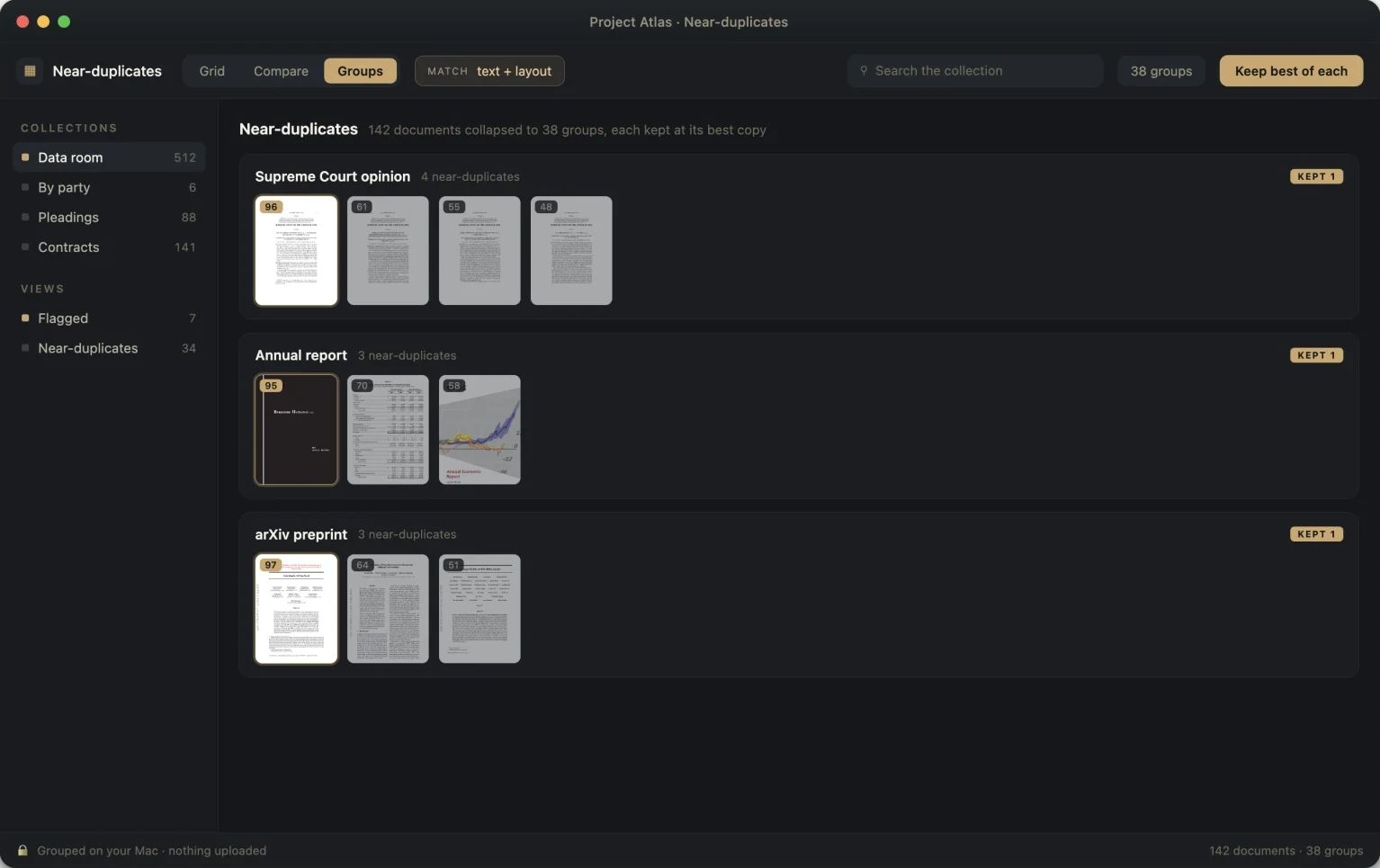
PageHawk collapsing 142 documents into 38 near-duplicate groups, keeping the best copy of each, with nothing uploaded.
Version
0.63.14 (build 79)
Requires
Apple Silicon Mac, macOS 26 or later
Download
6.6 MB Disk image
Security
Signed & notarized

Installing it

1

Open the disk image

A window opens with PageHawk in it, beside your Applications folder.

2

Drag it across

Drop PageHawk onto Applications. That is what clears the download quarantine, so automatic updates work from the first launch.

3

Open it

Because the app is notarized by Apple, it launches straight away. Eject the disk image afterwards.

Updates arrive by themselves from then on: PageHawk checks quietly, and you can also ask any time from PageHawk › Check for Updates. An Epiphani account or a licence key unlocks the Pro features; reading, annotating and comparing need neither.